
Splunk Security Analytics & Threat Hunting
Lab ID: LAB-SPL-001 · Version: 0.3 · Status: Proposed reference design
Purpose of the lab
Develop practical skills in telemetry collection, detection engineering, threat hunting, and incident investigation. The lab emphasizes explaining why a detection should work, testing it against known events, and measuring the quality of the evidence it produces.
Technical architecture
Linux and optional Windows hosts generate controlled security events. Appropriate forwarders or collectors send selected logs to Splunk. Indexes and source types organize the events; searches, dashboards, and alerts support analysis. An exercise register links each simulation to the expected events, detection logic, and observed results. AI application or gateway logs can be added later when their format and collection path are defined.
Baseline architecture
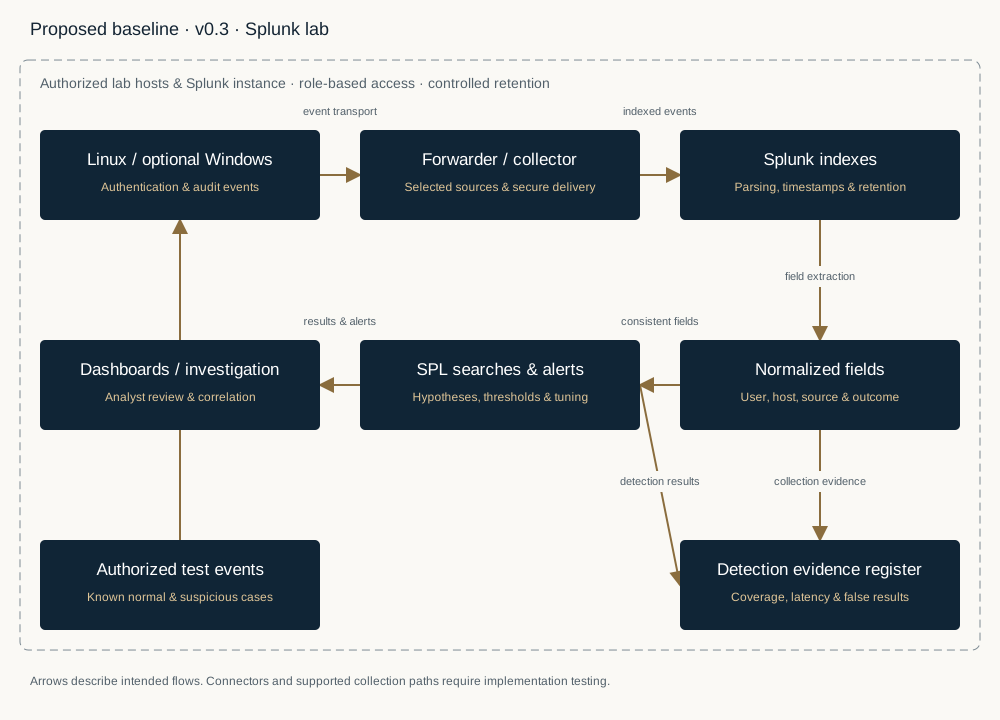
Components, purpose, and testing opportunities
| Component or feature | Brief description and purpose | Proposed implementation and tests |
|---|---|---|
| Linux security host | Provides authentication and operating-system telemetry. | Generate controlled successful and failed logins, privilege changes, and selected audit events. S17 ↗ |
| Optional Windows host | Adds complementary endpoint and authentication records. | Collect selected event channels and compare event meaning and timestamps across systems. S18 ↗ |
| Forwarder or collector | Transports selected events into the analytics environment. | Test installation, source selection, connectivity interruption, recovery, and delivery gaps. Universal Forwarder manual ↗ |
| Splunk indexing and source types | Stores events and controls their interpretation. | Define lab indexes, parse timestamps and fields, and test access restrictions and retention settings. Data Management ↗ |
| Search Processing Language — SPL | Expresses investigative questions and detection logic. | Develop searches for repeated login failures, success after failures, and changes in expected activity. Search Tutorial ↗ |
| Field normalization | Consistent field names make cross-source analysis possible. | Normalize users, hosts, addresses, and outcomes; assess extraction and mapping errors. Use add-ons or a common schema where appropriate. Common Information Model overview ↗ |
| Dashboards and alerts | Presents operational visibility and notifies analysts of selected conditions. | Build focused views, choose thresholds and windows, and test alert duplication and suppression. Alerting manual ↗ |
| Threat-hunting notebook | Records hypotheses, searches, findings, and follow-up questions. | Test a hypothesis against seeded evidence and document alternative explanations. S24 ↗ |
| Optional AI telemetry | Adds selected application, model gateway, or agent events. | Evaluate available fields for authentication failures, unusual requests, tool actions, and data-access anomalies without collecting unnecessary sensitive content. S25 ↗ |
| Detection evaluation register | Connects known test events to detection outcomes. | Measure detection coverage, latency, false positives, and missed events. Separate unknown activity from confirmed benign events. S26 ↗ |
Implementation stages, test scenarios & evidence
Implementation stages
1. Establish test hosts, a Splunk instance, access roles, and a retention plan.
2. Collect a small set of authentication and system logs; verify completeness and timestamp handling.
3. Normalize required fields and establish a normal-activity baseline.
4. Build a small detection library and focused dashboard.
5. Run authorized simulations, investigate results, and tune rules against documented evidence.
Initial test scenarios and evidence
| Test | Exercise and expected behavior | Evidence to retain |
|---|---|---|
| SPL-01 — Collection quality | Generate known events and verify arrival, parsing, and timestamps. | Source event counts, indexed counts, missing events, and parsing examples. |
| SPL-02 — Repeated SSH failures | Detect controlled repeated authentication failures within a defined window. | Search version, seed events, threshold, alert, and detection time. |
| SPL-03 — Success after failures | Correlate a controlled sequence for the same relevant identity and source. | Correlation keys, sequence, event-time assumptions, and result. |
| SPL-04 — Collection interruption | Observe behavior when a collector stops and restarts. | Gap duration, health evidence, recovered events, and any loss. |
| SPL-05 — Rule tuning | Compare a rule against known normal and suspicious examples. | Labeled cases, false positives, false negatives, and tuning rationale. |
| SPL-06 — Optional AI activity | Investigate a synthetic unusual agent or application sequence. | Defined log schema, seeded sequence, query, and coverage limitations. |
Requirements and limits
Document the installed Splunk edition, ingestion allowance, retention, and available features. The base design does not require Splunk Enterprise Security or SOAR; capabilities that depend on those products must be identified separately. All simulations stay within authorized lab systems.
Splunk sources
The following Splunk references were opened and reviewed for relevance to collection, data management, searching, normalization and alerting. Supporting references cover host telemetry, hunting, optional AI telemetry and test data. Institute-designed exercises require their own validation.
- S17 — Linux Audit & Security Telemetry · auditd(8) - Linux manual pageRetrieved 30 October 2026
- S18 — Windows Event Collection & Forwarding · Use Windows Event Forwarding to help with intrusion detection | Microsoft LearnRetrieved 30 October 2026
- S19 — Log Collection — Universal Forwarder · Official documentation ↗
Collection, deployment, configuration and troubleshooting.
Opened and reviewed in browser · 30 October 2026. Select the documentation version appropriate to the installed software. - S20 — Data Onboarding & Management · Official documentation ↗
Data onboarding, forwarding, processing and collection monitoring; links to the relevant manuals.
Opened and reviewed in browser · 30 October 2026. Select the documentation version appropriate to the installed software. - S21 — Search Analytics — SPL, Reports & Dashboards · Official documentation ↗
Practical exercises covering data loading, searches, lookups, reports, charts and dashboards.
Opened and reviewed in browser · 30 October 2026. Select the documentation version appropriate to the installed software. - S22 — Field Normalization — Common Information Model (CIM) · Official documentation ↗
Consistent field names and event tags, search-time normalization, data models and validation.
Opened and reviewed in browser · 30 October 2026. Select the documentation version appropriate to the installed software. - S23 — Alerting — Triggers, Scheduling & Response Actions · Official documentation ↗
Saved-search alerts, schedules, trigger conditions, throttling and response actions. Use the Search Tutorial for dashboards.
Opened and reviewed in browser · 30 October 2026. Select the documentation version appropriate to the installed software. - S24 — Threat Hunting — MITRE ATT&CK Framework · Get Started | MITRE ATT&CK®Retrieved 30 October 2026
- S25 — Optional AI Telemetry — OpenTelemetry Conventions · Moved: Generative AI semantic conventions | OpenTelemetryRetrieved 30 October 2026
- S26 — Detection Testing — Splunk Attack Datasets · GitHub - splunk/attack_data: A repository of curated datasets from various attacks · GitHubRetrieved 30 October 2026